Table of Contents
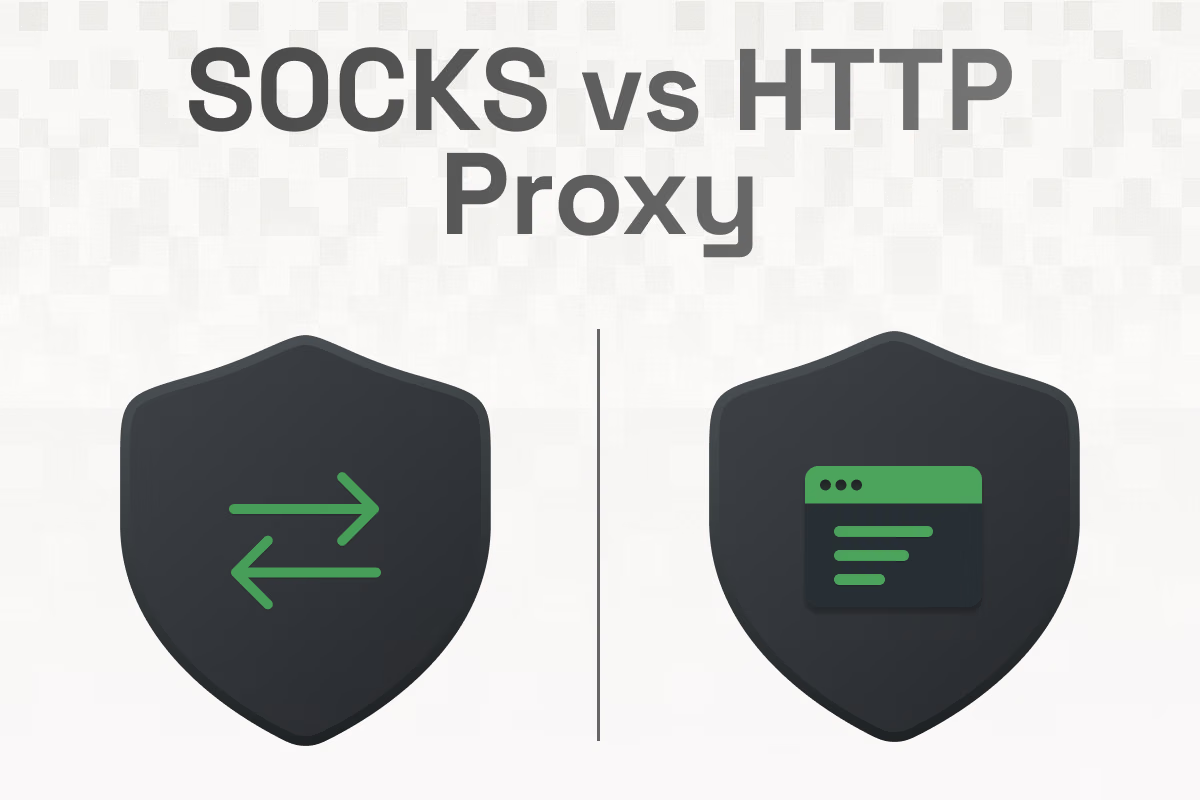
Proxies are the control plane for how your traffic reaches the internet. They relay requests, mask your IP address, and give you knobs for location, rotation, and session behavior.
If you care about privacy, automation, scraping, QA, geo testing, or multi-account operations, choosing the right proxy type is one of the most impactful decisions you can make. The two workhorse options are HTTP and SOCKS.
Each solves a different problem. Pick well and your stack feels fast and predictable. Pick poorly and you will wrestle with blocks, broken protocols, and brittle tooling. In this article, we’ll do a full SOCKS vs. HTTP proxy comparison.
What Is an HTTP Proxy?
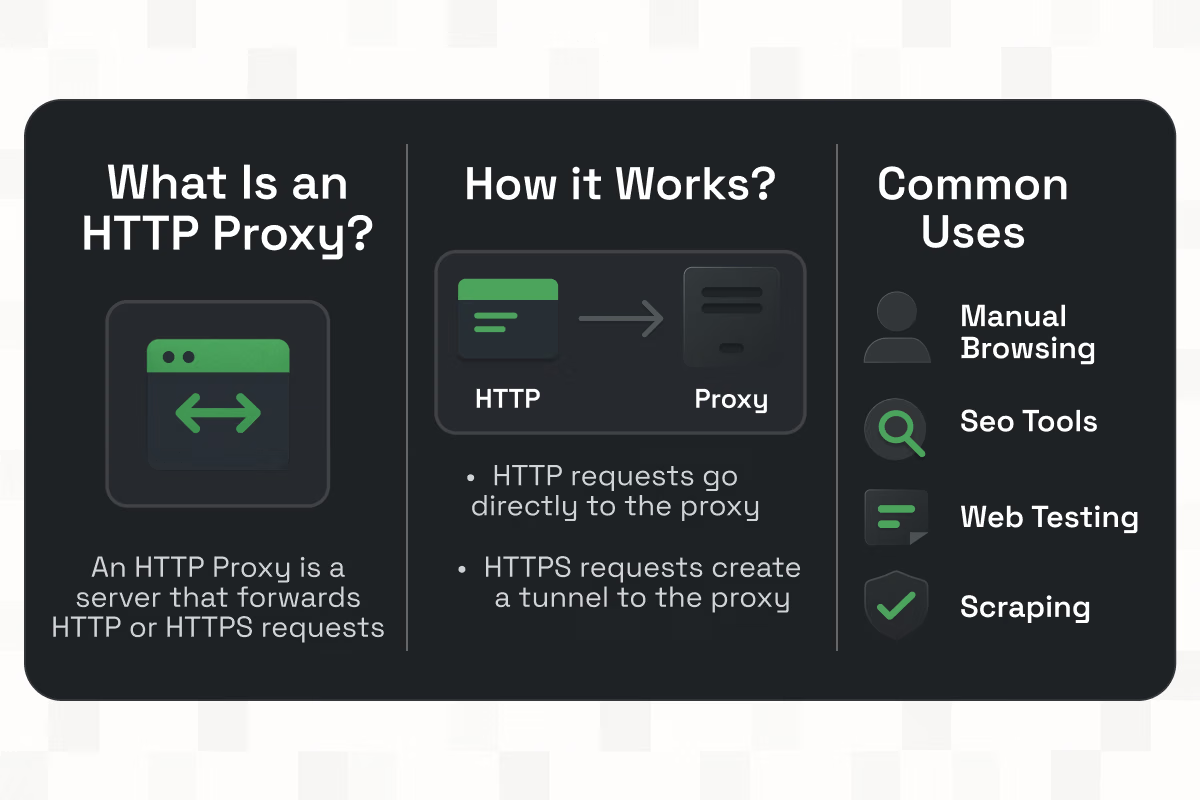
An HTTP proxy is a server that receives HTTP or HTTPS requests from a client, forwards them to the destination, and returns the response. It operates at OSI Layer 7. Because it is application-aware, it understands methods, headers, status codes, and caching rules. This awareness enables features like authentication injection, header rewriting, access policies, and content filtering.
How HTTP Proxies Work
- HTTP requests go directly to the proxy. The proxy can add headers, enforce policies, or cache responses before it contacts the target server.
- HTTPS requests typically use the CONNECT method to instruct the proxy to create a tunnel to the target. After the tunnel is established, your client performs TLS directly with the destination. The payload remains encrypted end to end while benefitting from the proxy’s IP address and geolocation.
Common Uses for HTTP proxies
- Manual browsing through different IPs or locations
- SEO tools that fetch SERPs and landing pages at scale
- Web testing and ad verification workflows
- Scraping and crawling stacks that only need web protocols
- Enterprise egress control where admins want to enforce HTTP-level policies
Because HTTP proxies are protocol-aware, they work smoothly with browsers, headless automation frameworks, and anything that speaks HTTP or HTTPS out of the box.
What Is a SOCKS Proxy?
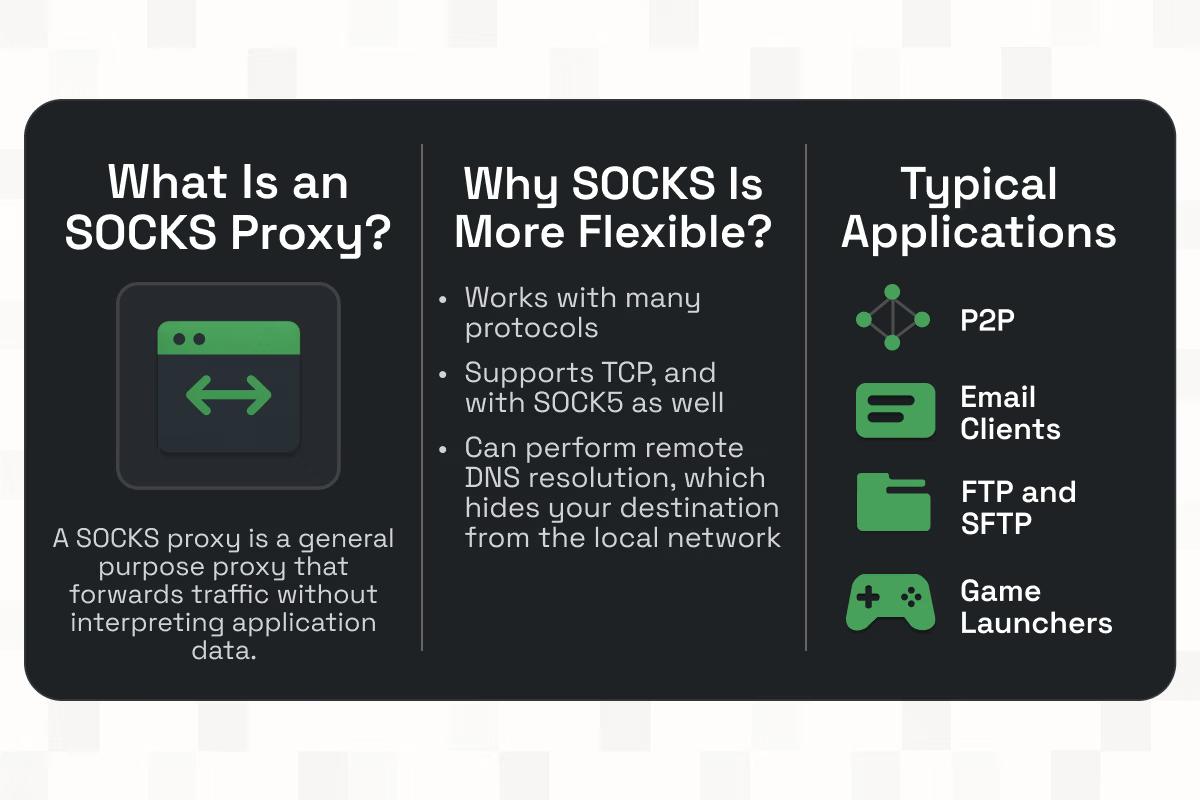
A SOCKS proxy is a general-purpose proxy that forwards traffic between a client and a server without interpreting application data. The most current and widely used version is SOCKS5. SOCKS sits below HTTP in the stack, so it can carry many kinds of traffic.
Why SOCKS is More Flexible
- Works with many protocols, not only HTTP or HTTPS
- Supports TCP, and with SOCKS5, UDP as well
- Can perform remote DNS resolution, which hides your destination lookups from the local network
- Useful for applications that do not natively understand HTTP proxies
Typical applications for SOCKS
- P2P and torrent clients
- Email clients using SMTP, POP3, or IMAP
- FTP and SFTP software
- Game launchers and multiplayer clients that rely on UDP or custom protocols
- Command-line tools or custom services that are not web-aware
If your environment includes any non-HTTP traffic or you want a single proxy type that can service many different applications, SOCKS5 is a strong default.
SOCKS4 vs SOCKS5: Key Differences
Let's discuss the core differences between SOCKS4 and SOCKS5 based on the characteristics.
SOCKS4
- TCP only
- No built-in authentication
- Basic connect semantics and IPv4 focus
- Legacy and limited for modern needs
SOCKS5
- Username and password authentication
- UDP support, alongside TCP
- Domain name resolution done by the proxy, which improves privacy and bypass behavior
- Modern features, including IPv6 support and better error handling
In practice, when a product or doc mentions “SOCKS” today, it almost always means SOCKS5. If a tool still supports SOCKS4, treat it as an exception.
HTTP vs SOCKS Proxy: Feature Comparison
As now we know about HTTP and SOCKS proxies, let's get into the detailed feature comparison.
Speed and Performance
- HTTP proxy: Often fastest for web-only tasks, especially when keep-alive, pooling, and HTTP-aware caching are enabled. Because the proxy understands the protocol, it can optimize some flows.
- SOCKS proxy: Adds very little logic of its own. On pure web traffic the difference is small. On mixed or non-HTTP traffic the advantage goes to SOCKS5 because it simply forwards packets instead of bending them into HTTP constructs.
Security and Anonymity
- HTTP proxy: With HTTPS, the payload is encrypted end to end. Because the proxy sits at Layer 7, it can add or inspect headers. That is useful for auth and enterprise policies but should be understood in regulated contexts.
- SOCKS5: Treats traffic like a blind pipe and supports username and password authentication. Remote DNS resolution reduces local information leakage and sometimes avoids DNS-based blocks.
Protocol and Application Compatibility
- HTTP: Best for browsers, headless crawlers, SEO suites, and most web testing tools.
- SOCKS5: Best for multi-protocol environments, desktop apps, file transfer tools, gaming, messaging, and any workflow that needs UDP or non-HTTP services.
Use Cases Overview
- Scraping and crawling: Both work. Many scraping frameworks default to HTTP proxies, while some headless stacks prefer SOCKS5 for flexibility and remote DNS.
- Gaming and real-time apps: Prefer SOCKS5 because of UDP support and broader protocol compatibility.
- Streaming: Either can work. When a player does not support HTTP proxies directly, SOCKS5 is easier to integrate.
- Enterprise egress and web filtering: HTTP wins because admins can build policy at the HTTP layer.
Which Proxy Should You Choose?
Use these decision shortcuts to avoid overthinking it.
- Choose HTTP if all of your tools are web based. Examples include SERP checkers, price tracking, content QA, headless browser crawlers, and ad verification dashboards. You get application-aware behavior and the easiest setup across browsers and scraping frameworks.
- Choose SOCKS5 if you need multi-protocol coverage or if your applications include email, file transfer, message queues, or gaming clients. If you require UDP or want the proxy to perform DNS lookups so your local network does not see destination domains, choose SOCKS5.
- Choose a hybrid if your environment mixes web and non-web traffic. Point browser and crawler modules to HTTP, and everything else to SOCKS5. If your provider issues both types through the same dashboard with the same rotation controls, the hybrid approach becomes easy to operate.
Scenario snapshots
- Growth and SEO team fetching public landing pages, SERPs, and APIs at volume: HTTP proxies with request-based rotation. Sticky sessions only for login-gated flows.
- QA lab validating a mobile app that uses HTTPS, WebSockets, and a custom UDP heartbeat: SOCKS5, so all protocols route consistently.
- File transfer pipeline that uploads via SFTP and also verifies web content in 30 countries: SOCKS5 for SFTP, HTTP for web verification.
- Privacy workflow where DNS leakage is a concern: SOCKS5 with remote DNS, plus short sticky windows for account sessions.
Best Proxy Provider for SOCKS and HTTP: Why Choose Floxy

The easiest proxy stack is one where both HTTP and SOCKS5 are available on the same plan, with unified controls for rotation, session stickiness, TTL, and geolocation.
Floxy fits that profile. You get global coverage across residential, ISP, datacenter, and mobile networks, with endpoints that expose HTTP and SOCKS5 on the same credentials. The docs are straightforward, and the connection strings encode important behavior such as session ID, location, and time-to-live.
Key Benefits
- HTTP and SOCKS5 support on the same networks, so you can flip types without rewriting your stack
- Global IP coverage with residential and ISP types for trust, plus datacenter and mobile options when speed or carrier-grade routing matters
- Rotating and static choices, with sticky sessions for flows that need continuity
- Human-readable credentials that embed rotation mode, session ID, TTL, and location parameters
- Developer-friendly quick starts and examples in the docs, reducing trial-and-error
- Pricing flexibility wide enough for individual operators and enterprise teams
If your team uses both browser automation and app-level clients, keeping everything inside one provider simplifies ops, reduces misconfiguration, and speeds up incident response.
How to Use a SOCKS or HTTP Proxy
The setup patterns below are designed to copy straight into a team runbook.
Manual Setup on Browsers and Devices
Below are setup guides for different browsers and devices:
Google Chrome and Microsoft Edge
- Open system proxy settings from the browser or OS.
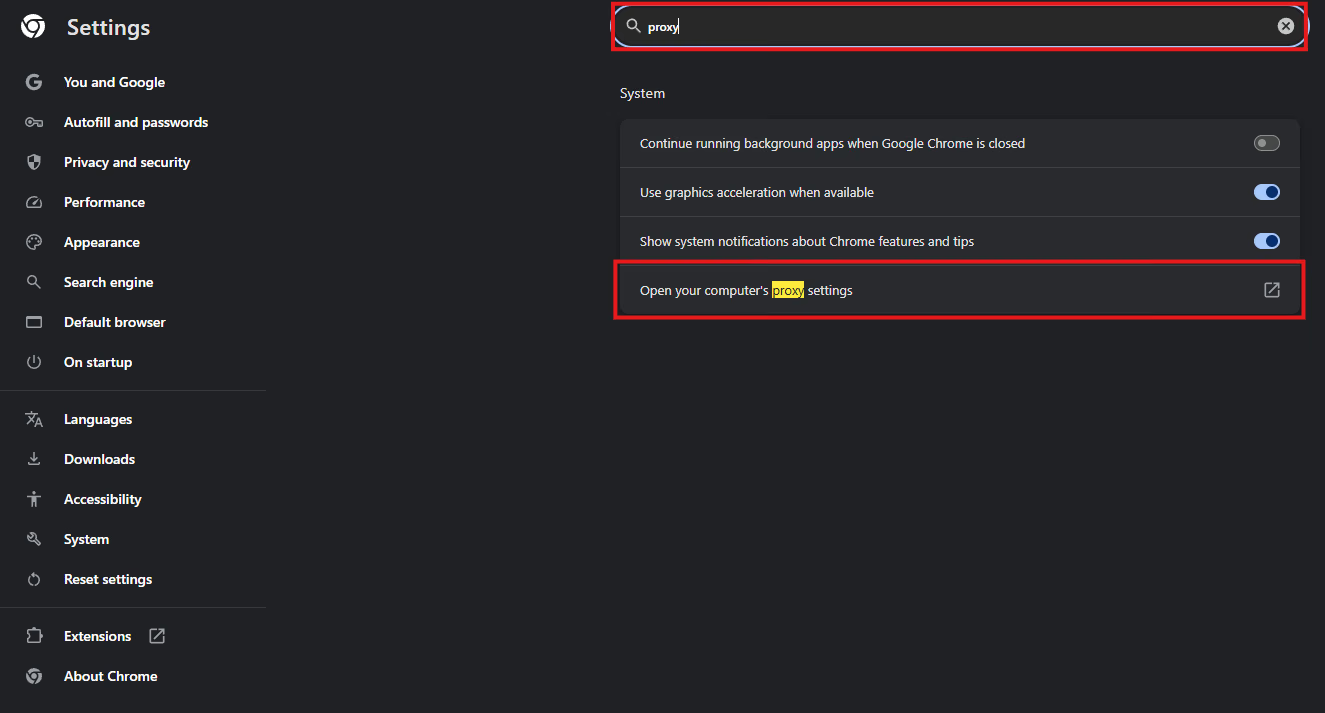
- For HTTP, enter the proxy host, port, username, and password.
- For SOCKS5, point your system or helper client to the SOCKS host and port. Some teams expose a local SOCKS port through a desktop client, then forward that to the provider endpoint.
Mozilla Firefox
- Settings → General → Network → Settings.
- Choose Manual proxy configuration.
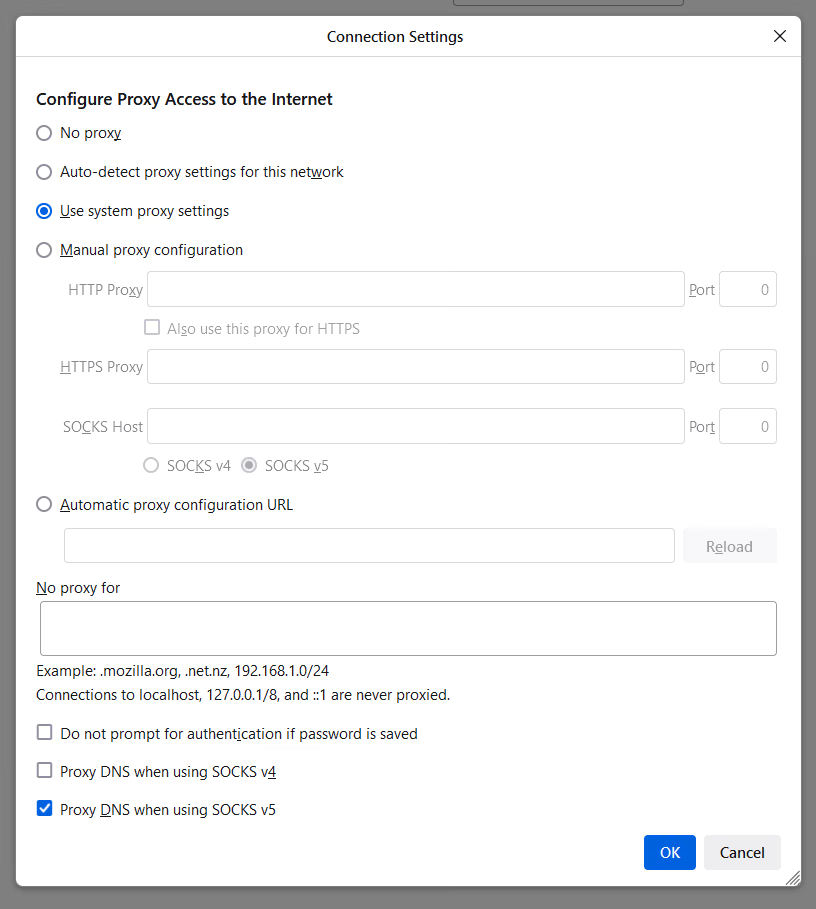
- For web work, set HTTP Proxy and check Use this proxy server for all protocols if desired.
- For SOCKS5, fill SOCKS Host and port, select SOCKS v5, and enable Proxy DNS when using SOCKS v5 to keep lookups remote.
iOS and Android
- Wi-Fi network settings allow a manual proxy host and port. For SOCKS5 device-wide routing, use a helper app that exposes a local SOCKS interface and forwards it to your provider.
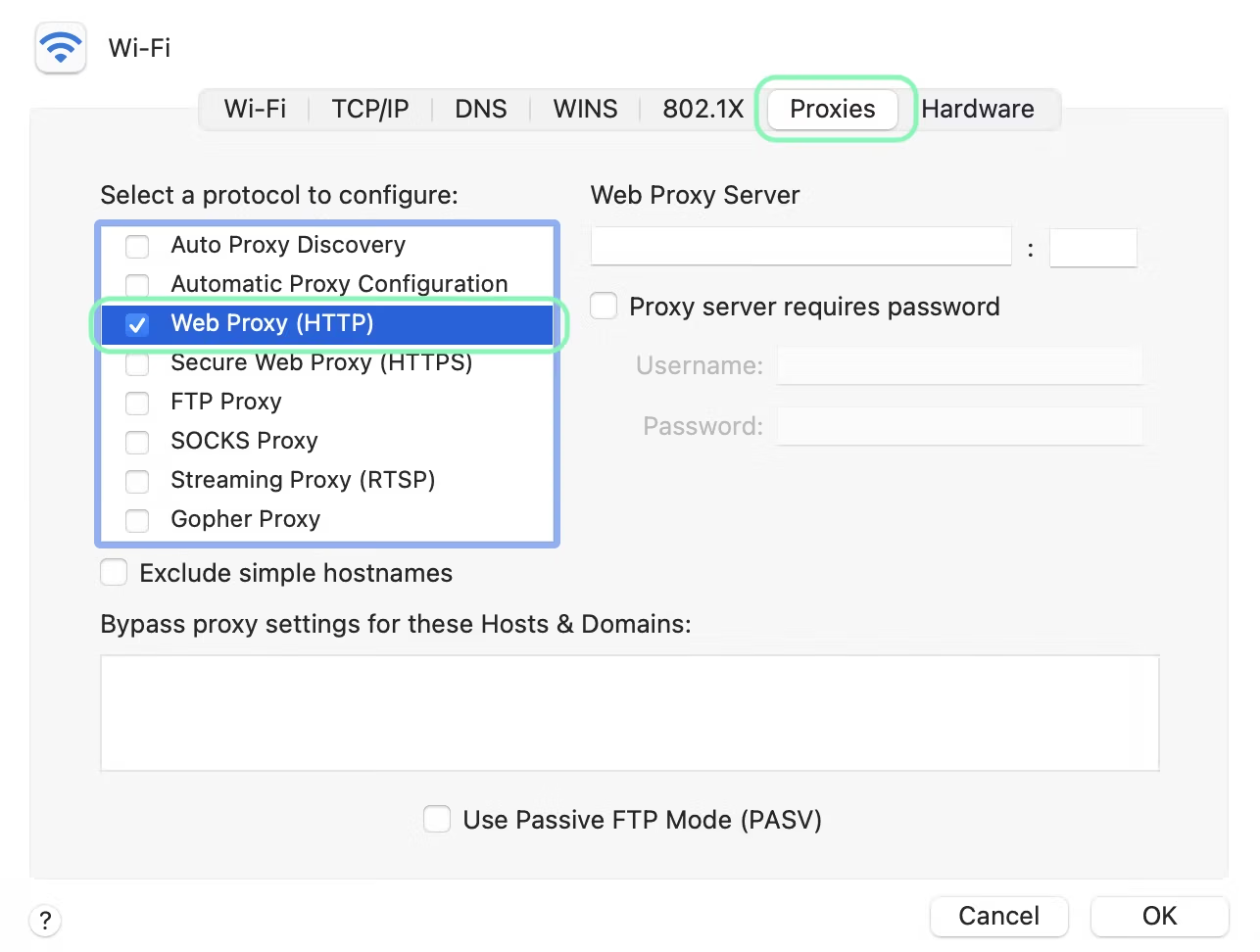
macOS
- System Settings → Network → your interface → Details → Proxies.
- Check Web Proxy (HTTP) or SOCKS Proxy and enter host, port, and credentials.
- Save and test with a site that shows your IP and location.
Windows
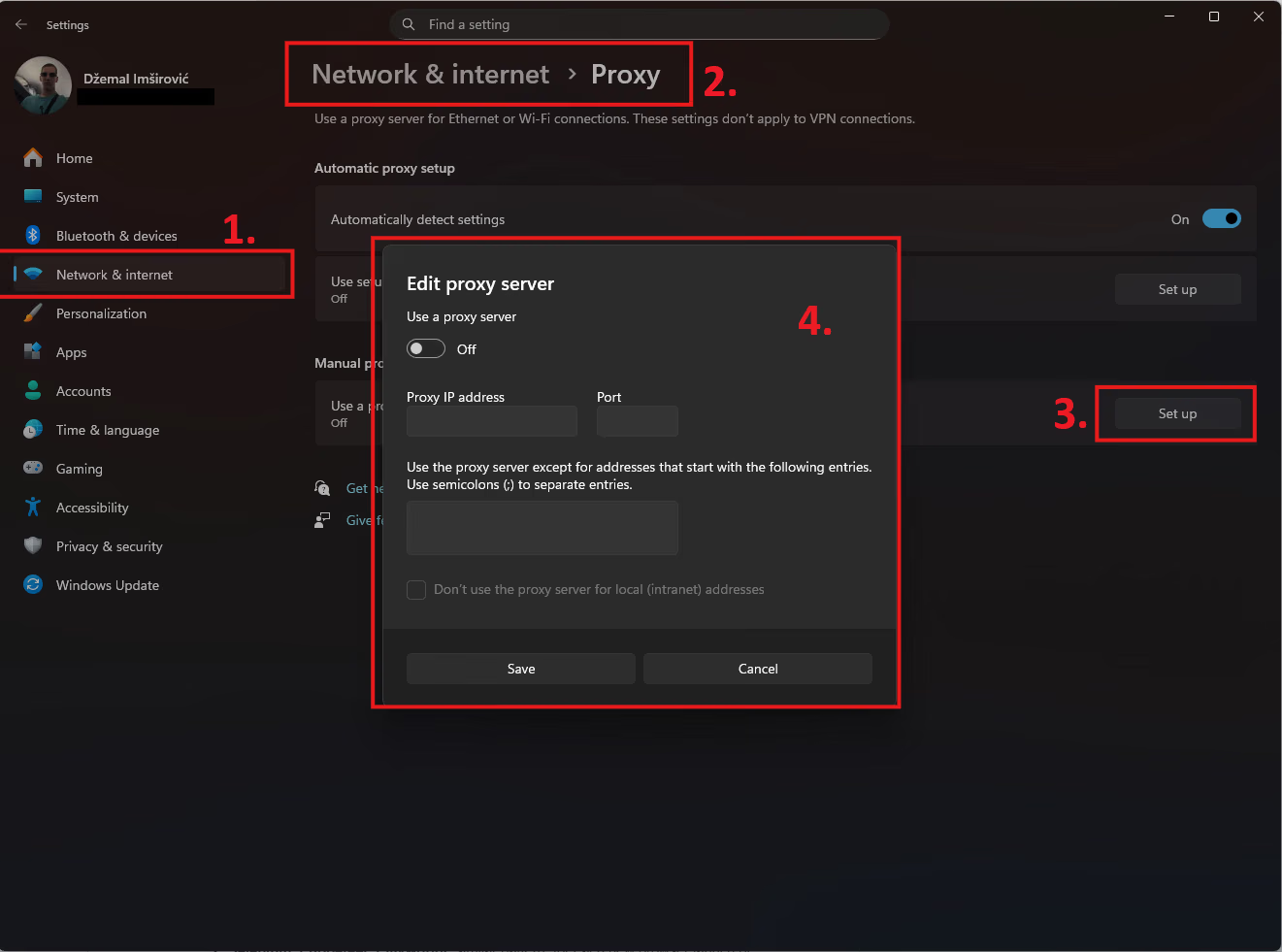
- Settings → Network and Internet → Proxy.
- Under Manual proxy setup, set your HTTP or SOCKS host and port.
- For per-app routing, consider a desktop client such as Proxifier to avoid sending all traffic through the proxy.
Linux
- Export http_proxy and https_proxy environment variables for HTTP workflows.
- For SOCKS5, wrap apps with proxychains or tsocks, or configure your desktop environment’s network proxy settings.
Integration with Proxy Managers or Scraping Tools
Below are how different integrations work with proxy managers and scraping tools for both types of proxies.
Browser-side managers
- FoxyProxy and Proxy SwitchyOmega let you create profiles and rules. You can assign a specific profile to a domain pattern, toggle between HTTP and SOCKS5 endpoints quickly, and keep the rest of your OS untouched. This is the simplest way to give QA or growth teams location control without admin rights.
Desktop routing clients
- Proxifier on Windows or macOS can route only selected processes through HTTP or SOCKS5. You can create rules and chains, and even simulate rotation across a static list if a backconnect gateway is not used. This is useful for desktop apps that lack native proxy settings.
Scraping frameworks and headless browsers
- Python Requests, aiohttp, HTTPX: pass a proxy URL using either http://user:pass@host:port for HTTP or socks5://user:pass@host:port for SOCKS5.
- Scrapy: configure a proxy middleware or set request.meta['proxy'] per request. It is common to point Scrapy at an HTTP rotating gateway, then switch to a short sticky session for authenticated flows.
- Puppeteer and Playwright: launch contexts with either HTTP or SOCKS proxies. You can rotate by switching credentials or session IDs between navigations while preserving browser state.
Using Rotating Proxies for Large-scale Tasks
Independent of proxy type, large projects benefit from three rotation patterns. Most modern providers, including Floxy, expose all three through simple credential parameters.
- Request-based rotation: Each request uses a new IP. This spreads load across a wide pool and reduces per-IP volume, which helps prevent blocks. Ideal for public pages, SERPs, and price checks.
- Session-based rotation: Keep a sticky IP for a short period while you log in, add to cart, or step through multi-page forms, then rotate. The session window might be measured in seconds or minutes depending on network type. This pattern works equally well over HTTP and SOCKS5.
- Geo-targeted rotation: Target a country, region, or city. For mobile or ISP networks, you can often specify ASN to remain inside a carrier. This improves realism for mobile-heavy destinations and ad verification.
Floxy’s credential strings encode the rotation mode, session ID, TTL, and location directly in the username, which keeps runbooks simple and reduces configuration drift across teams.
See the Floxy Docs quick start, then check Proxy Generation and Authorization for exact parameters. If your organization uses browser extensions or proxy managers, you can also review Extensions for one-click setups.
Practical selection checklist
Use this seven-point checklist to lock in a decision:
- What protocols do you need? If the answer is only HTTP or HTTPS, start with HTTP proxies. If you need email, FTP, games, or anything UDP based, choose SOCKS5.
- Do you need the proxy to do DNS? If yes, SOCKS5. If no, either works.
- Will you rotate at request level or session level? Make sure the provider supports both modes with adjustable TTL.
- How important is geo realism? If you need carrier-grade routing or ASN targeting, check mobile or ISP proxy options.
- What are your throughput and latency requirements? Datacenter IPs are fast. Residential and ISP IPs have higher trust at the cost of speed and price.
- Who will configure clients? If non-technical users need easy switching, plan for browser extensions and desktop routing tools.
- How will you observe health? Track success rate, ban rate, median response time, and error codes by target. Use that feedback to tweak rotation mode and location.
Conclusion
HTTP and SOCKS proxies both route your traffic through a different IP address, but they serve different shapes of work. HTTP proxies are application-aware at Layer 7, so they are efficient, controllable, and widely supported for browsers, headless crawlers, SEO platforms, and ad verification.
SOCKS5 proxies are more general and support authentication, UDP, and remote DNS. They handle games, messaging stacks, file transfer tools, and privacy workflows that need more than web.
If your projects are entirely web based, choose HTTP. If you need multi-protocol coverage or want the proxy to handle DNS and UDP, choose SOCKS5. Many teams run both and route modules to the type that fits best.
For a provider that offers HTTP and SOCKS5 across residential, ISP, datacenter, and mobile networks, with rotation modes, sticky sessions, and developer-friendly controls, start with Floxy.
You will be able to evaluate HTTP and SOCKS in the same environment, with consistent rotation and geotargeting, and choose the proxy that matches your workload with confidence.